
How to Connect Shopify with GeekSeller When Using Buy with Prime
This guide explains how to use Shopify with GeekSeller when Buy with Prime (BwP) is enabled. Since both GeekSeller and Buy with Prime connect to Amazon MCF, special setup is required to avoid duplicate inventory and incorrect fulfillment.
How Buy with Prime Works in Shopify
Buy with Prime connects to Shopify by creating a dedicated location.
This location:
- Stores inventory pulled from Amazon MCF
- Is used for orders fulfilled by Buy with Prime
Orders fulfilled by Buy with Prime can be identified by:
- Fulfillment service: Amazon Fulfillment
- Assigned Shopify location: Buy with Prime location
- Order tag: Buy with Prime
How GeekSeller Connects to Shopify
GeekSeller also connects to Amazon MCF and requires its own Shopify location.
This location:
- Syncs inventory from Amazon MCF
- Is used for orders that GeekSeller will fulfill
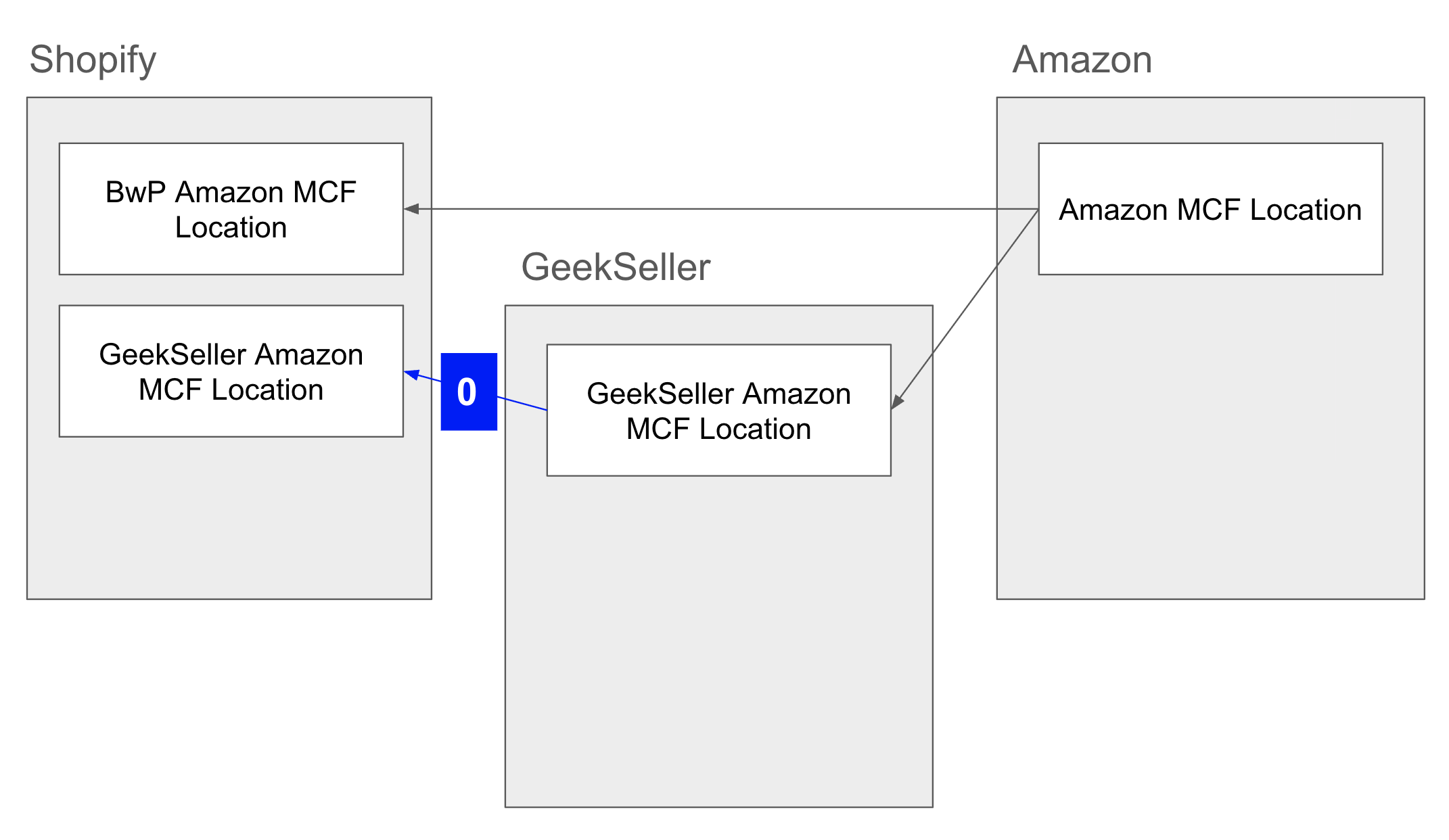
The Problem: Duplicate Inventory
If both Buy with Prime and GeekSeller sync MCF inventory into Shopify:
* The same inventory is stored in two locations
* Shopify will sum quantities from both locations
* This results in incorrect (doubled) inventory
Solution: Set GeekSeller Quantity to 0
To avoid duplication:
- Configure a quantity rule in GeekSeller
- Always send quantity = 0 to the GeekSeller MCF location in Shopify
This ensures:
- Only Buy with Prime location holds actual inventory
- Inventory is not duplicated
 Order Routing Setup in GeekSeller
You need to configure automation rules to separate Buy with Prime orders from others.
1. Exclude Buy with Prime Orders
In GeekSeller automation rules:
- Detect orders where fulfillment service = Amazon Fulfillment
- These are Buy with Prime orders
- Set action: Do not assign any warehouse
This prevents GeekSeller from processing orders already handled by Buy with Prime.
2. Process Non-Buy with Prime Orders via MCF
For orders you want GeekSeller to fulfill:
- Ensure they are assigned to the GeekSeller Amazon MCF location
- Enable MCF auto-fulfillment in: Orders → MCF Settings
This allows GeekSeller to automatically send orders to Amazon MCF.