
To connect your Wayfair account with GeekSeller, first go to the GeekSeller Integrations page, click Wayfair, and complete the form with the requested information.
Once the form has been submitted, you must grant API permissions to a GeekSeller user account in Wayfair Partner Home so we can complete the integration setup.
Before you begin, please contact GeekSeller at support@geekseller.com or via live chat to obtain the email address to use when inviting the GeekSeller user account.
Step 1: Grant GeekSeller Access
- Log in to Wayfair Partner Home.
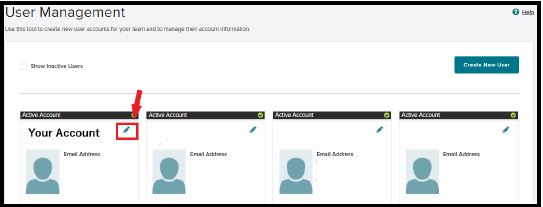
- From the left navigation menu, navigate to Account Management > User Management.
- Add or locate the GeekSeller user account.
- Click the Edit icon next to the user.
Step 2: Enable API Permissions
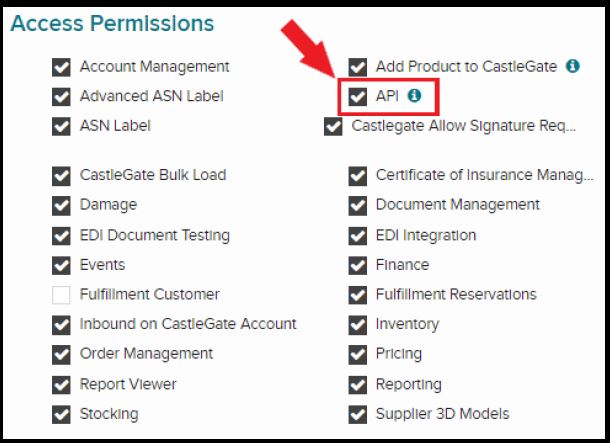
- In the Access Permissions section, locate the API permission.
- Select the API checkbox to allow the user to create and manage API applications.
- Review and grant any additional permissions required by your organization.
Step 3: Save Your Changes
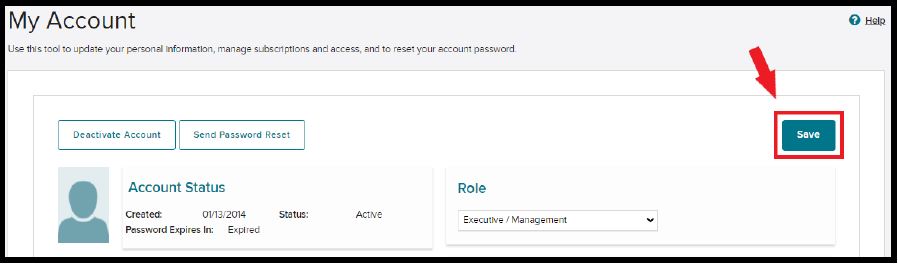
- Click Save to apply the permission changes.
- Once saved, the GeekSeller user account will have access to Wayfair API tools.
Step 4: Notify GeekSeller
After completing the steps above, please contact GeekSeller to let us know. Once API access has been granted, we will create and configure the Wayfair API application and complete the integration setup.
Wayfair Products
- Currently, products must be created directly in Wayfair.
- Please note that the Wayfair Supplier Part Number for each product must match the corresponding GeekSeller SKU. If these values do not match, inventory synchronization will not work correctly.
- Whenever you add new products to your Wayfair account, please let us know so we can import them into GeekSeller and include them in the integration.