
TikTok Shop supports two shipping methods: TikTok Shipping and Seller Shipping. You can use both in the same shop by setting up different warehouses.
When a customer places an order, TikTok selects the warehouse based on available inventory, warehouse location, and other routing rules. The selected warehouse determines which shipping method is used.
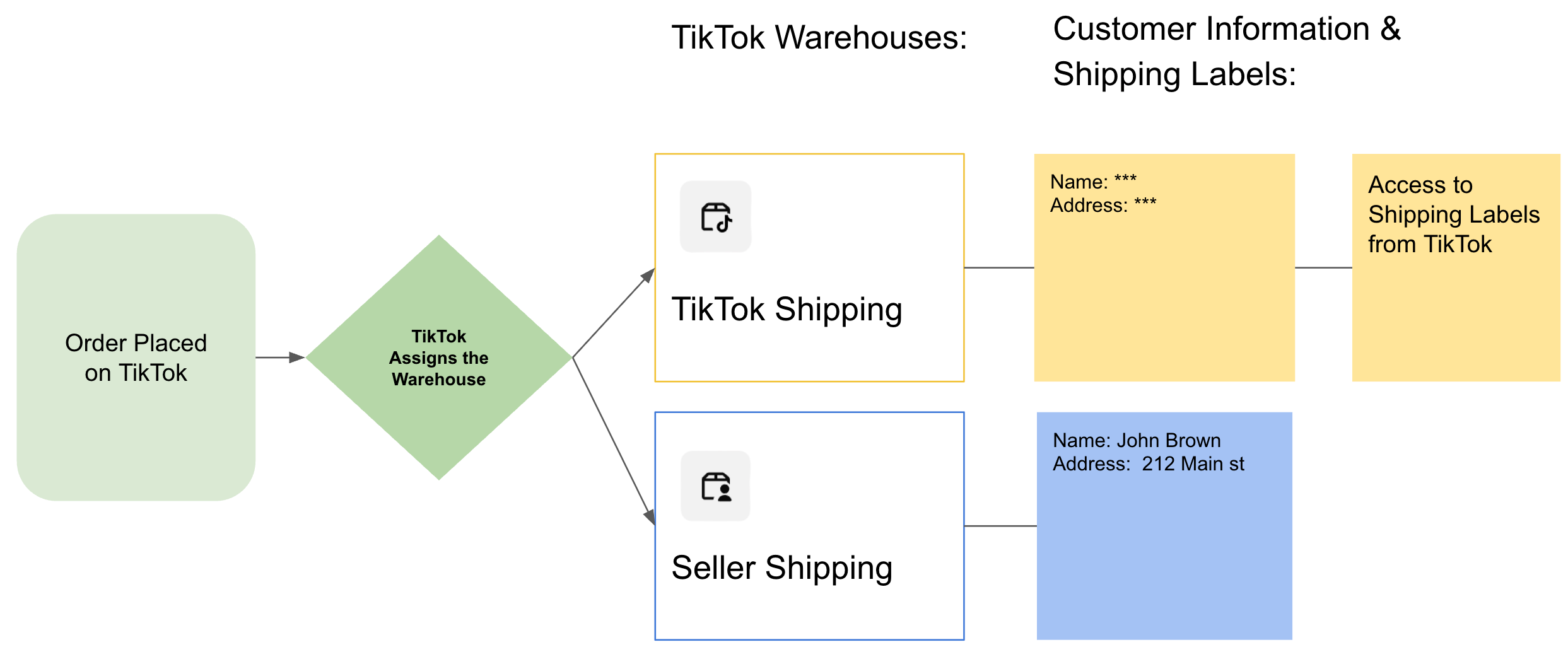
TikTok Shipping vs. Seller Shipping
| Feature | TikTok Shipping | Seller Shipping |
|---|---|---|
| Shipping carrier | Managed by TikTok | Managed by seller |
| Shipping labels | Provided by TikTok | Generated by seller or fulfillment service |
| Customer information | Masked | Available |
| Amazon MCF | Not supported for these orders | Supported through GeekSeller |
| Tracking | Managed through TikTok | Provided by seller or fulfillment service |
| Warehouse selection | TikTok assigns | TikTok assigns |
How Does TikTok Select a Warehouse?
You can create multiple warehouses and configure each for TikTok Shipping or Seller Shipping.
For example:
- Warehouse A: Seller Shipping (Amazon MCF)
- Warehouse B: TikTok Shipping
If both warehouses have inventory, TikTok may select either one based on the customer’s location and its routing rules.
Adding more warehouses or changing their shipping methods can affect how future orders are assigned.
How to Prioritize a Warehouse
TikTok does not offer a simple warehouse priority setting. However, you can influence warehouse selection by controlling inventory quantities.
For example, to prioritize Amazon MCF:
- Keep inventory available in Warehouse A (Seller Shipping).
- Set the quantity in Warehouse B (TikTok Shipping) to 0.
- TikTok will see only Warehouse A as having available stock for that SKU.
You can use GeekSeller inventory quantity rules to automate this setup, where supported.
What Is the Default Warehouse?
In TikTok Shop Seller Center, you can select the default warehouse.
The default warehouse is automatically assigned to newly created products. However, that doesn’t mean TikTok will prioritize this warehouse when assigning orders.
TikTok still selects warehouses based on available inventory, customer location, and other routing rules.
Important for GeekSeller Users
If you use Amazon MCF to fulfill TikTok orders through GeekSeller, make sure the orders are assigned to a Seller Shipping warehouse.
TikTok Shipping orders have restricted customer information, so you can’t fulfill them through Amazon MCF in the same way.
You can retrieve TikTok Shipping labels through TikTok’s API. GeekSeller supports TikTok Shipping labels, allowing sellers to retrieve and print shipping labels directly from GeekSeller, even when customer information is masked by TikTok.
Note: Fulfilled by TikTok (FBT) has separate fulfillment rules and may take priority over seller warehouses.
For more information, see the TikTok Shop Warehouse Management Guide.